
Apple HomeView looks beautiful. But will it earn its place in your home?
A promising new way to control an Apple home — and a good reason to look beyond the screen
Apple announced several long-awaited home products today: a new Apple TV 4K, HomePod mini 2 and the new Apple HomeView smart display.
Whether to buy Apple's new HomeView is a little complicated.
My first reaction was that it looked great. The square display is refreshing, the hardware is unmistakably Apple, and the idea of having FaceTime sitting proudly on the kitchen bench or coffee table is kind of appealing...
It does fill an obvious gap in Apple’s range. Google and Amazon have offered smart displays for years. Apple users finally have a device designed to sit at the centre of the home, rather than relying on an iPad, HomePod or iPhone.
But once the initial appeal wears off, what will this device actually do for you every day?
There is plenty to like
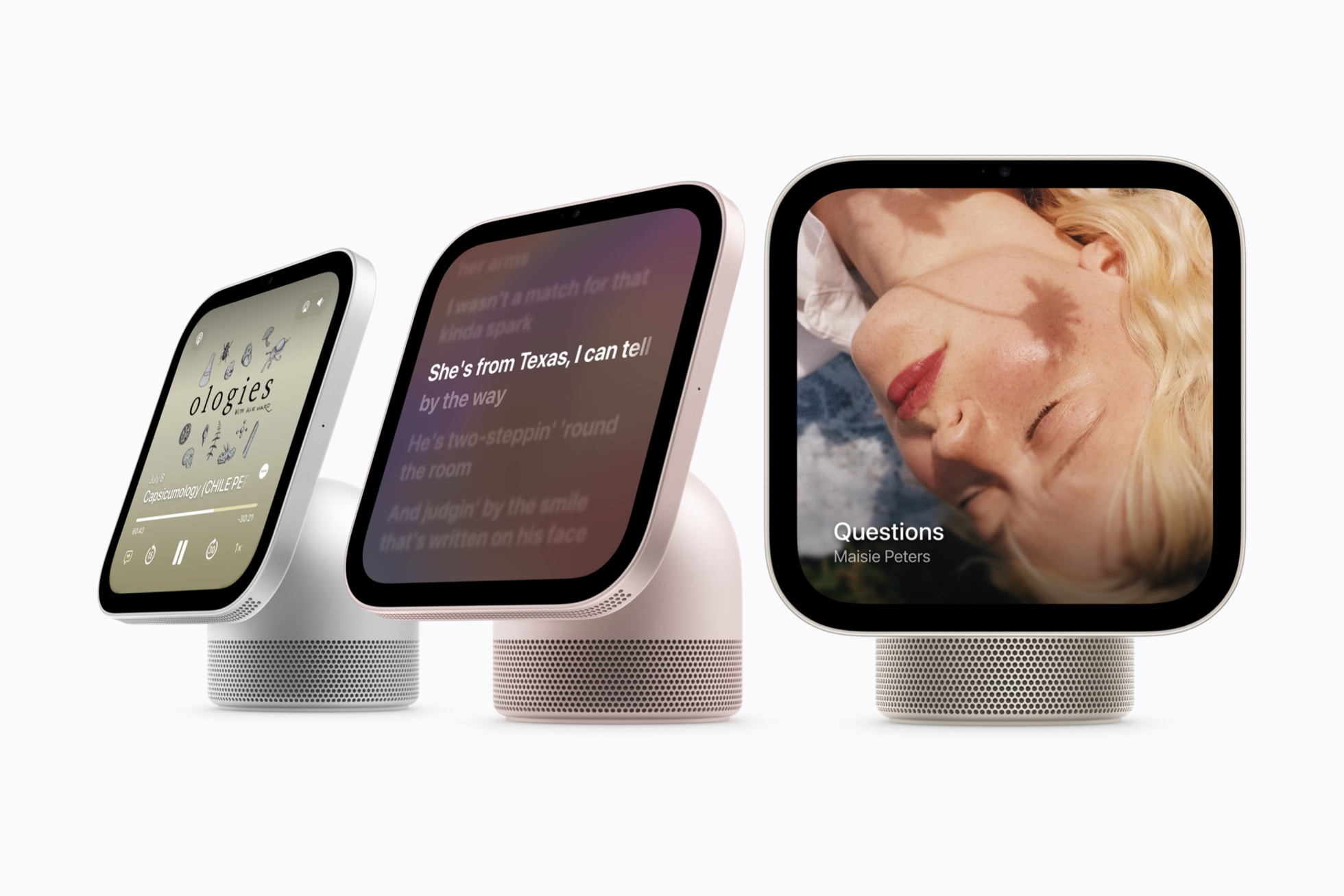
HomeView looks like part giant Apple Watch, part square iPhone or iPad, and part speaker.
Its seven-inch display can show photos, calendars, reminders, timers, music, video, camera feeds and smart home controls. The built-in speakers handle music and other audio, while the camera and Centre Stage make it a natural FaceTime device for shared spaces.
The ability to recognise up to six people by their faces is particularly clever. A shared household screen can become personal when you approach it, while keeping each person’s messages, calendar and other information separate. Apple’s emphasis on privacy also matters when a camera and microphone are going to live in a central part of the home.
Handoff should make it easy to continue a song, podcast, call, video or recipe from an iPhone on HomeView. Apple’s integration is often at its best in moments like these. You do not need to stop and think about which device you are using; the experience simply follows you.
For a household already invested in Apple products, that polish will be a major part of the appeal.
A lovely screen still needs a job
The challenge is that most Apple households already have several screens close at hand.
An iPhone can make a FaceTime call, play music, show a recipe and control the home. An iPad can do all of that on a larger display. An Apple Watch handles quick interactions, and an Apple TV already brings much of the ecosystem into the living room.
HomeView makes those things more convenient in a shared location. That may be genuinely valuable. But convenience is only useful when it solves a problem you actually have.
Will your family regularly make FaceTime calls from the kitchen? Will you use it as the main way to control lights, blinds and cameras? Will it replace a clock, photo frame, speaker or wall-mounted control panel that you already use?
Or will it become a A$449 device sitting on the bench, permanently plugged in, waiting for someone to remember it is there?
The software is polished, but what's the boundaries?
Apple’s interface will almost certainly be one of HomeView’s strengths. The company is very good at making complicated technology feel approachable, and that is valuable in a device intended for everyone in the household.
However, HomeView is not simply a small iPad for the home.
Apple says a selection of its own apps will be available, along with compatible third-party audio and video apps from an iPhone. That is useful, but it is much narrower than having a general App Store and being able to install whatever software you need.
That may never be a problem if HomeView already does everything you want. It may also become frustrating if your needs change, a favourite service is unsupported, or you expect the display to become a flexible household computer.
The attractive interface should not distract from that limitation. Before buying one, it is worth deciding whether you are comfortable with the device Apple has designed today, rather than the device it might become after future updates.
A smart home display is not the same as a smart home
This is the part that interests me most.
HomeView could be an excellent interface for controlling an Apple Home. It can put lights, locks, blinds, cameras, scenes and other devices in one attractive, accessible place.
It can also be part of a much broader system. Home Assistant’s HomeKit Bridge can make compatible Home Assistant entities available in Apple Home, including devices that do not natively support HomeKit. That means HomeView could become the polished front end that everyone in the family sees, while Home Assistant quietly handles more advanced automations and connections behind it.
For some homes, that could be a very good combination.
But it is important to understand the different roles. HomeView is the interface. It is the screen you touch and the assistant you speak to. A platform such as Home Assistant can still provide the deeper logic, broader device support and links between ecosystems that make a home work as one system.
A beautiful dashboard does not automatically make the systems behind it reliable, useful or well integrated.
Who is HomeView really for?
I can see HomeView working well for people who:
- already use Apple devices throughout the household
- want a simple shared dashboard rather than a highly customised one
- will regularly use FaceTime, music, photos, timers and calendars in a central room
- value Apple’s approach to privacy and personalisation
- want easy access to an existing, well-designed Apple Home setup
I would think more carefully if you:
- already have an iPad or another display doing much the same job
- use a mix of smart home ecosystems and expect one device to control everything directly
- want deep customisation or a broad choice of apps
- need sophisticated automations rather than a nicer way to trigger them
- cannot name the task HomeView will make easier every day
None of these points makes HomeView a bad product, they will guide you towards deciding how useful this device is to you in the long run.
The electronics-box test
I have tried several Google and Amazon smart displays over the years. Some were interesting. Some were useful for a while. More than one eventually ended up in the box of electronics I had grown bored with.
That experience makes me cautious.
New technology gets a generous period at the beginning. We explore it, demonstrate it to visitors and make excuses to use it. The real test comes six months later, when the novelty has gone.
Is it still saving time?
Is the family using it without being reminded?
Has it replaced something else, or has it simply added another screen and another cable?
If it stopped working tomorrow, would anyone miss it?
Those questions matter more than how impressive it looks in an Apple presentation.
My early view
I am not writing HomeView off. Far from it.
The design is appealing, the square format is cute, the facial recognition appears genuinely cool, and Apple’s ecosystem integration gives it an advantage that competing displays simply cannot reproduce for committed Apple households.
I can also imagine recommending it to some Everyday Logic customers. In the right home, it could be a friendly, consistent way for the whole family to interact with technology that has been thoughtfully integrated behind the scenes.
But I would not start a smart home design with HomeView itself.
I would start by asking what the household wants to make easier. Then I would work out which systems, automations and interfaces best serve those needs. HomeView may be part of that answer, but the polished device on the bench should be the final layer of the solution, not the reason for building it.
There will no doubt be software updates, and a future generation may add capabilities that make the case more compelling. For now, I would judge this first version on what it can do at launch.
Look past the lovely design and slick software. Decide what role it will play, what it can connect to, and whether your family will still use it when the new-product excitement has passed.
If those answers are clear, HomeView could earn a permanent place in your home.
If they are not, A$449 may be buying a very attractive answer to a question you never really asked.
Header image courtesy of Apple Newsroom. Apple and HomeView are trademarks of Apple Inc.
Join the conversation
Thoughts, questions & ideas
We’d love to hear from you. Comments are reviewed before they appear here.
Loading comments…